

Businesses that still route paper documents for signature are losing days — sometimes weeks — to printing, scanning, chasing approvals, and manual filing. In 2026, organizations need faster, more secure ways to sign documents, manage agreements, and store signed documents without relying on paper-based workflows. That is why electronic signatures and documents signed electronically have become essential for modern business.
The global eSignature market is projected to reach $24.7 billion by 2030, growing at a CAGR of 26.1% from 2024 to 2030, according to the research by Prescient & Strategic Intelligence.
This guide covers eight document types where electronic signatures can deliver gains in speed, cost, and compliance. You will also learn how electronic and digital signatures work, where a digital signature adds extra security, and how to choose electronic signature solutions that support your signing process from upload to audit trail.
TL;DR: Your eSignature checklist for 2026
- Digitize sales contracts to accelerate sales and close deals faster.
- Streamline new hire onboarding with documents signed electronically.
- Use electronic signature software for vendor agreements and procurement workflows.
- Enable online document signing for lease agreements and real estate forms.
- Protect sensitive information in healthcare consent and intake forms.
- Use secure eSignature workflows for legal documents and client agreements.
- Improve finance approvals with signed invoices and expense reports.
- Approve construction change orders from any device, even on-site.
1. Sales contracts and proposals: Close deals before momentum dies
Sales teams should sign agreements electronically because speed matters at the exact moment a buyer is ready to move forward. A contract that sits unsigned for three days can lose urgency, create uncertainty, or give a competitor time to re-enter the conversation.
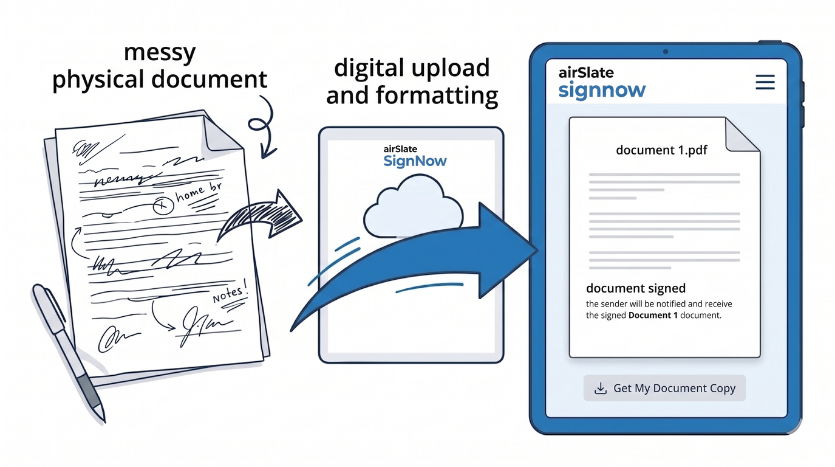
With electronic signatures, reps can create, send, and complete contracts without printing a document, attaching a PDF manually, or waiting for a handwritten signature. Instead, the signer receives a secure link, reviews the agreement, and completes the document signing process from a computer, tablet, or mobile device.
Among other trends, consider the impact of AI on contracts and agreements.
How to implement electronic signatures for sales teams
When starting your eSignature implementation, a clear list of actions can help you make the transition go smoothly. Here are some items to consider:
- Create reusable contract templates for NDAs, MSAs, SOWs, and sales proposals.
- Connect your eSignature software to your CRM via integrations so reps can send signed documents electronically without leaving Salesforce or Microsoft Dynamics 365.
- Use a signing order when internal legal or finance approval is required before the customer signs.
- Enable automatic reminders so signature requests do not stall.
- Use an audit trail to track every action, including signer identity, IP address, and timestamp.
As you can see, implementing electronic signatures for your sales team requires some preparation and integration with existing tools. But the benefits are well worth it, especially in today’s fast-paced business world where deals need to be closed quickly and efficiently.
Example sales workflow
A sales rep closes a call at 4 p.m. on a Friday. Instead of emailing PDF documents and asking the client to print, sign, scan, and return them, she sends the agreement through secure electronic signature software. The client opens the link on their phone, reviews the form, adds an electronic signature, and submits it. Both parties immediately receive a signed document with a complete audit trail.
Online document signing helps sales teams reduce manual work, improve visibility, and close deals faster. With tools like SignNow, users can securely sign documents online and store them in a cloud-based system. This eliminates the need for physical storage and provides easy access to all sales-related documents signed electronically.
“Tech Data uses SignNow to improve our internal and external customer service while increasing our speed to revenue.”
Bob Dutkowsky, CEO, Tech Data
2. New hire onboarding paperwork: Complete documents before day one
HR teams handle a large volume of electronic documents, including offer letters, tax forms, direct deposit authorizations, policy acknowledgments, and confidentiality agreements. When these files are handled on paper, missing fields and delayed signatures create unnecessary administrative work.
Using electronic signatures for onboarding lets HR teams sign documents online before a new employee’s first day. Required fields help reduce errors, while secure folders make it easier to store signed documents for future access and compliance review.
How to improve HR eSignature workflows
These steps are helpful when working to shift from paper-based processes to eSignature workflows:
- Create templates for offer letters, W-4s, I-9s, NDAs, and employee handbook acknowledgments.
- Send documents in bulk for seasonal hiring or cohort onboarding.
- Set the signing process so the offer letter is completed before additional forms are released.
- Configure automatic reminders for incomplete signature requests.
- Store documents signed electronically in organized folders by department, role, or hire date.
With documents signed electronically, HR teams can easily access and review them for compliance purposes.
Why this matters
Electronic onboarding helps HR teams replace manual filing with a consistent electronic process. Employees can sign electronically from any device, while HR can track completion status in real time. This improves efficiency and reduces the risk of lost paper files.
3. Vendor agreements and procurement documents: Reduce manual work and processing costs
Vendor agreements, purchase orders, statements of work, and supplier contracts are ideal candidates for electronic signature solutions. Procurement teams often manage multiple approval layers, and a paper-based process can slow down business-critical purchases.
When teams use electronic signature software, they can create templates, route approvals automatically, and ensure each agreement is completed before work begins. A secure audit trail, like SignNow’s History Audit, also helps document every step of the signing process.
How to digitize procurement documents
Time and the involvement of different parties are crucial factors in the procurement process. Using electronic signature software can help streamline processes and improve efficiency, while also ensuring compliance with regulations. Keep these steps in mind:
- Build reusable templates for vendor contracts, NDAs, purchase orders, and SOWs.
- Set internal approval routing before the agreement goes to the vendor.
- Use automatic reminders to prevent delays.
- Track signer identity, IP address, timestamp, and document access history.
- Integrate with ERP or procurement tools to reduce duplicate data entry.
The list can be extended, depending on the specific needs of your organization. However, these steps provide a good starting point for digitizing procurement documents.
Best-fit documents
Procurement teams can use electronic signatures for:
- Vendor agreements
- Supplier onboarding forms
- Purchase orders
- Contractor agreements
- Compliance acknowledgments
- Renewal forms
By replacing paper with secure documents signed electronically, procurement teams can increase efficiency while maintaining clear records for compliance needs.
4. Real estate lease agreements: Sign from any location, on any device
Real estate professionals need fast, flexible document signing because buyers, sellers, tenants, landlords, and property managers are rarely in the same place. Electronic signatures make it possible to sign lease agreements, disclosure forms, rental applications, and purchase offers without scheduling an in-person meeting.
With online document signing, clients can review and sign documents online from a computer or mobile device. Agents can upload PDF documents, add signature fields, send a secure link, and receive the signed agreement immediately after completion.
How real estate teams can use eSignatures
- Create templates for lease agreements, rental applications, disclosure forms, and purchase offers.
- Send a secure signing link so clients can sign without creating an account.
- Use a mobile app to prepare and send documents from showings or open houses.
- Apply a signing order when multiple parties need to sign.
- Set document expiration dates for time-sensitive offers.
In our previous blog post, we covered more details on electronic lease agreement signing. Please check it out.
Why mobile signing matters
A property manager can send a lease from a tablet. A tenant can sign electronically from a phone. A seller can approve a purchase offer while traveling. This flexibility helps real estate teams reduce delays while maintaining secure access to sensitive documents signed electronically.
SignNow delivers a seamless mobile experience for all parties involved in the signing process
5. Patient consent and intake forms: Protect sensitive data without slowing patient flow
Healthcare providers manage sensitive information every day. Patient intake forms, consent forms, HIPAA acknowledgments, telehealth agreements, and treatment authorizations all require secure handling and reliable document access.
Electronic signatures help healthcare teams collect signatures before appointments, reduce front-desk bottlenecks, and support secure workflows. Instead of filling out paper forms in the waiting room, patients can complete electronic documents from home or on a mobile device.
How healthcare practices can use electronic signatures
According to the National Library of Medicine’s scoping review, digital signatures in the healthcare industry will grow by 31% annually. Here are some recommendations for making the digitization process more understandable:
- Create templates for consent forms, intake questionnaires, HIPAA acknowledgments, and telehealth agreements.
- Send forms before appointments by email or SMS.
- Use kiosk mode for patients who need to complete forms in person.
- Confirm that your electronic signature software supports your healthcare compliance requirements.
- Store documents signed electronically in secure folders with appropriate access controls.
Security considerations
To safeguard patient data and ensure regulatory adherence, healthcare organizations should opt for an eSignature solution like SignNow, which provides robust security features including encryption, access controls, and comprehensive audit trails. A simple image of a handwritten signature is not enough for sensitive documents because it does not verify the signer’s identity or provide a clear record of the signing event. In the guide for healthcare providers, we’ve explained more about HIPAA and eSignatures.
Our video on the topic also explains how SignNow helps the healthcare industry:
6. Legal client engagement letters: Support authentication and legal recognition
Law firms and legal service providers use electronic signatures for engagement letters, retention agreements, settlement documents, NDAs, and other legal documents. In many cases, the core question is no longer whether an electronic signature is valid, but whether the firm can show who signed and when.
A secure eSignature platform should capture signer identity, document access history, IP address, timestamps, and completion status. These records help support legal recognition and can be important if a signature is disputed.
How legal teams should structure signature workflows
- Use two-factor authentication for high-value or sensitive documents.
- Enable a Certificate of Completion for every signed agreement.
- Review the audit trail to confirm signer identity and timestamps.
- Store documents signed electronically in matter-specific folders.
- Use access controls to protect sensitive information.
In a previous blog post, we explored the advantages of using eSignature solutions for law firms, using SignNow as an example.
7. Financial invoices and expense reports: Accelerate approvals and payment collection
Finance teams can use electronic signatures for invoices, purchase approvals, expense reports, payment authorizations, and internal control documents. These workflows often require multiple people to review and approve a document before payment can move forward.
With electronic signature solutions, finance teams can create approval workflows, track every signature request, and maintain a clear audit trail. This can help reduce manual work, improve visibility, and increase efficiency across accounting operations.
How finance teams can use eSignature software
- Create invoice and approval templates with pre-filled fields.
- Set a signing order for department heads, finance leaders, and external clients.
- Use payment integrations when customers need to approve and pay in one workflow.
- Store signed documents with accounting records.
- Integrate with ERP systems, Google Drive, or other tools to keep files organized.
Common finance documents to sign electronically
- Invoices
- Expense reports
- Purchase approvals
- Budget approvals
- Vendor payment authorizations
- Internal compliance forms
When signed documents are securely stored and linked to accounting systems, finance teams gain better visibility into approval status and reduce manual routing. For more benefits for the finance industry, check our blog: eSignatures in finance: Вoosting efficiency and strengthening data security.
8. Construction change orders and bids: Approve from the job site, not the office
Construction teams often need signatures from people who are not sitting at a desk. Project managers, subcontractors, property owners, and field supervisors may all need to sign change orders, bids, lien waivers, safety forms, and subcontractor agreements.
Electronic signatures help construction teams keep projects moving by allowing users to sign electronically from a mobile device, even when they are away from the office. Mobile access can be especially useful on job sites.
How construction teams can improve document signing
- Create templates for subcontractor agreements, change orders, bids, and lien waivers.
- Use a mobile app for field-based signing.
- Set signing orders for project managers, owners, and subcontractors.
- Use automatic reminders to avoid schedule delays.
- Save documents signed electronically in secure project folders.
Why this helps projects stay on track
A delayed change order can hold up work, increase costs, and create disputes. Electronic signature workflows help teams document approvals quickly while maintaining a complete audit trail for future reference.
Common mistakes to avoid when signing electronically
Electronic signatures can simplify business workflows, but only when implemented correctly. Avoid these common mistakes when choosing tools and setting up your signing process.
Mistake 1: Treating a signature image as a secure electronic signature
Pasting an image of a handwritten signature into a document may look official, but it does not provide strong authentication, tamper evidence, or a detailed audit trail. For business documents, use secure electronic signature software that records signer identity and document activity.
Mistake 2: Confusing electronic signatures and digital signatures
Electronic signatures show a person’s intent to sign a document electronically. Digital signatures use cryptographic technology, often supported by digital certificates, to help verify identity and detect changes after signing.
For routine business agreements, simple electronic signatures may be enough. For more regulated or sensitive documents, a digital signature may offer stronger protection.
Mistake 3: Assuming all free tools offer the same security
Free tools may be useful for basic signing, but they often lack advanced security, custom branding, embedded signing, bulk sending, audit trails, and compliance features. For business contracts, legal documents, and sensitive data, choose signature software designed for secure workflows.
Mistake 4: Ignoring international legal requirements
The ESIGN Act supports the legal validity of many electronic signatures in the United States. Other jurisdictions have their own rules, such as eIDAS in the European Union.
Before sending documents to international signers, confirm the legal requirements for each country involved.
eSignature best practices checklist
A strong eSignature process should do more than help users sign documents online. It should also improve consistency, protect sensitive information, and create a reliable record for every completed document.
- Start with high-volume workflows: Digitize the documents your team sends most often, then use templates and required fields to reduce manual work and incomplete submissions.
- Secure the signing process: Use secure links, verify signer identity for high-value agreements, and keep an audit trail for every completed document.
- Organize and protect signed documents: Store files in secure folders, manage document access, and apply access controls for sensitive documents.
- Connect your existing tools: Integrate eSignature software with Google Drive, Microsoft Word, CRM, ERP, and other tools your team already uses.
- Support customer-facing workflows: Use custom branding, automated reminders, and embedded signing when documents are sent through your app, website, or sales process.
- Confirm legal and compliance requirements: Ensure your electronic signatures are legally binding in the relevant jurisdiction and comply with applicable compliance standards.
Following these best practices helps teams create faster, more secure signature workflows that are easier to manage and scale. With SignNow, you can easily create an electronic signature online and apply it to any document that needs to be signed.
How to measure the success of your eSignature implementation
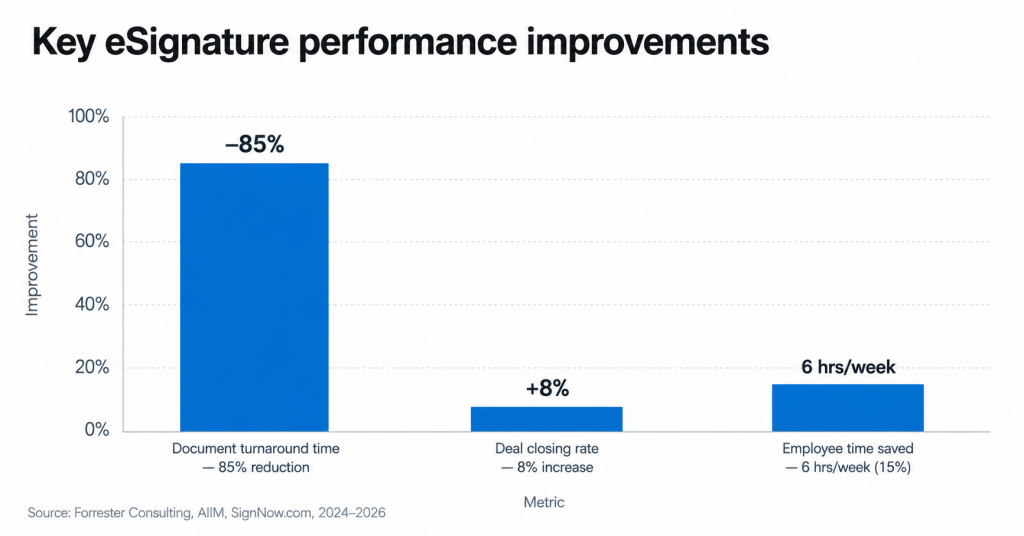
Tracking the right metrics helps determine whether your electronic signature process is reducing delays, saving costs, and improving business outcomes.
How to Track Performance
Start by measuring your current paper-based or manual process. Then track improvements after implementing electronic signature workflows at 30, 60, and 90 days.
Focus on:
- Average time to sign
- Number of incomplete documents
- Number of manual follow-ups
- Cost per completed agreement
- Percentage of documents signed from a mobile device
- Number of signature requests completed without support
These metrics show whether your electronic process is helping teams work faster and more securely. With its blend of modern eSignature capabilities, templates, collaboration features, and robust security measures, SignNow has earned its place on Gartner’s list of top electronic signature solutions.
Final thoughts
In 2026, the question is not whether businesses should use electronic signatures. The better question is which documents should be digitized first and how each signature workflow should be secured.
Sales contracts, onboarding paperwork, vendor agreements, lease agreements, patient consent forms, legal engagement letters, financial approvals, and construction change orders are among the highest-impact documents to sign electronically. Each one can benefit from faster turnaround, lower manual effort, better document access, and a stronger audit trail.
The best starting point is simple: choose one high-volume document, create a reusable template in SignNow, send it through secure electronic signature software, and measure the results. Once your team sees the time saved, it becomes much easier to expand online document signing across the business.
Ready to replace manual paperwork with faster, secure e-signature workflows?
Start your free SignNow trial today and create, send, and sign documents online in minutes.
Glossary
Audit trail: A timestamped record of every action taken on a document, including when it was opened, signed, completed, and stored. An audit trail helps verify signer activity and supports compliance needs.
Digital certificate: A digital credential used to help verify identity in digital signature workflows. Digital certificates are often connected to certificate-based signing methods.
Digital signature: A cryptographic method that helps verify the signer’s identity and detect whether a document was altered after signing. Digital signatures are different from simple electronic signatures, though both may support legally binding agreements depending on the context.
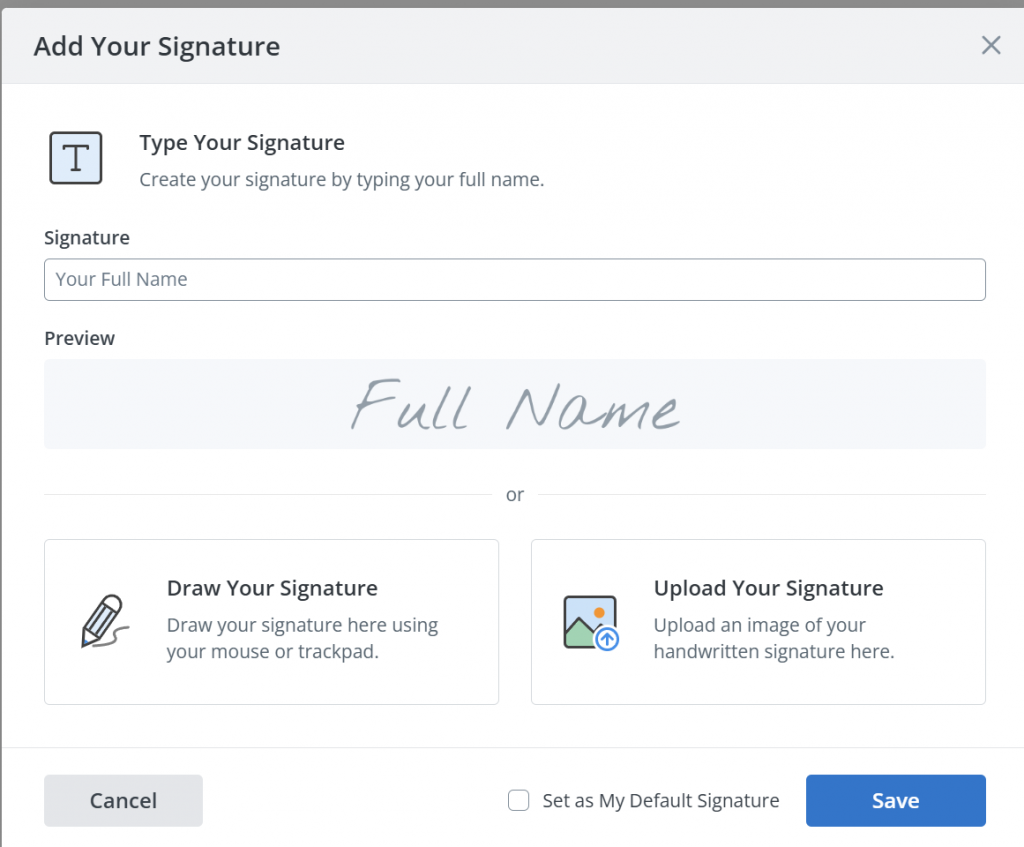
Electronic signature: A broad term for an electronic indication of agreement. This can include typing a name, drawing a signature, clicking to accept, or using eSignature software to sign documents online.
Embedded signing: A signing experience built directly into an app, website, or business workflow, allowing users to sign without leaving the platform.
ESIGN Act: A US federal law that gives many electronic signatures the same legal effect as handwritten signatures for commercial and consumer transactions.
Public key infrastructure: A security framework that uses cryptographic keys and digital certificates to help verify identity and protect digital transactions.
FAQ
Is an electronic signature legally binding?
Yes, it is. In many jurisdictions, electronic signatures can be legally binding when the signer clearly intends to sign and consents to doing business electronically. In the United States, the ESIGN Act and UETA provide legal recognition for many electronic signatures. In the European Union, eIDAS provides a separate legal framework.
How do you prove who signed an electronic document?
Secure eSignature software generates an audit trail for every document. This record can include the signer’s name, email address, IP address, device information, timestamp, and each action taken during the signing process.
How can I create an electronic signature online for free?
Many electronic signature solutions, including SignNow offer a free trial. During the trial, you can usually upload a document, add signature fields, create an electronic signature by typing or drawing your name, and send the document for signing.
Can I sign PDF documents electronically?
Yes, you can. For example, when using SignNow, you upload PDF documents, add signature fields, send the file to one or more signers, and store the completed document securely. Many platforms also support Microsoft Word files, forms, contracts, and other common business document formats.
What is the most important best practice to start with?
Start with the document type that moves most frequently through your organization and causes the most delay. For many businesses, that is either sales contracts, HR onboarding paperwork, vendor agreements, or customer forms.
Sources
- P&S Intelligence: Electronic Signature (E-Signature) Market Size & Share Analysis – Trends, Drivers, Competitive Landscape, and Forecasts (2024-2030)
- Research Gate: AI-Powered Contracts Analysis for Risk Mitigation and Monetary Savings
- PubMed Central: The impact of electronic medical records on clinical documentation: A case study
- Gartner reviews: Electronic Signature Reviews and Ratings
- Digital Signature Market (2026 – 2033) — Forrester Research, 2024
- State of Intelligent Information Management — AIIM, 2025
- G2: SignNow reviews
- TL;DR: Your eSignature checklist for 2026
- 1. Sales contracts and proposals: Close deals before momentum dies
- 2. New hire onboarding paperwork: Complete documents before day one
- 3. Vendor agreements and procurement documents: Reduce manual work and processing costs
- 4. Real estate lease agreements: Sign from any location, on any device
- 5. Patient consent and intake forms: Protect sensitive data without slowing patient flow
- 6. Legal client engagement letters: Support authentication and legal recognition
- 7. Financial invoices and expense reports: Accelerate approvals and payment collection
- 8. Construction change orders and bids: Approve from the job site, not the office
- Common mistakes to avoid when signing electronically
- eSignature best practices checklist
- Final thoughts
- Glossary
- FAQ
- Sources